
5 MIN READ
How Injuries Change NBA Player Props: Using the With and Without Filters

PickFinder Team •Updated: Nov 06, 2026
At 12:40 PM on November 6, RJ Barrett's points line on PrizePicks was 22.5. At 1:11 PM it was 25.5. A three-point jump in half an hour usually means the app expects a bigger role, and in the NBA a bigger role usually means someone else is hurt. This guide uses that Toronto at Milwaukee game to show how to check whether an injury really changes a player's numbers, or whether the line has already gone too far.
Start with the injury report
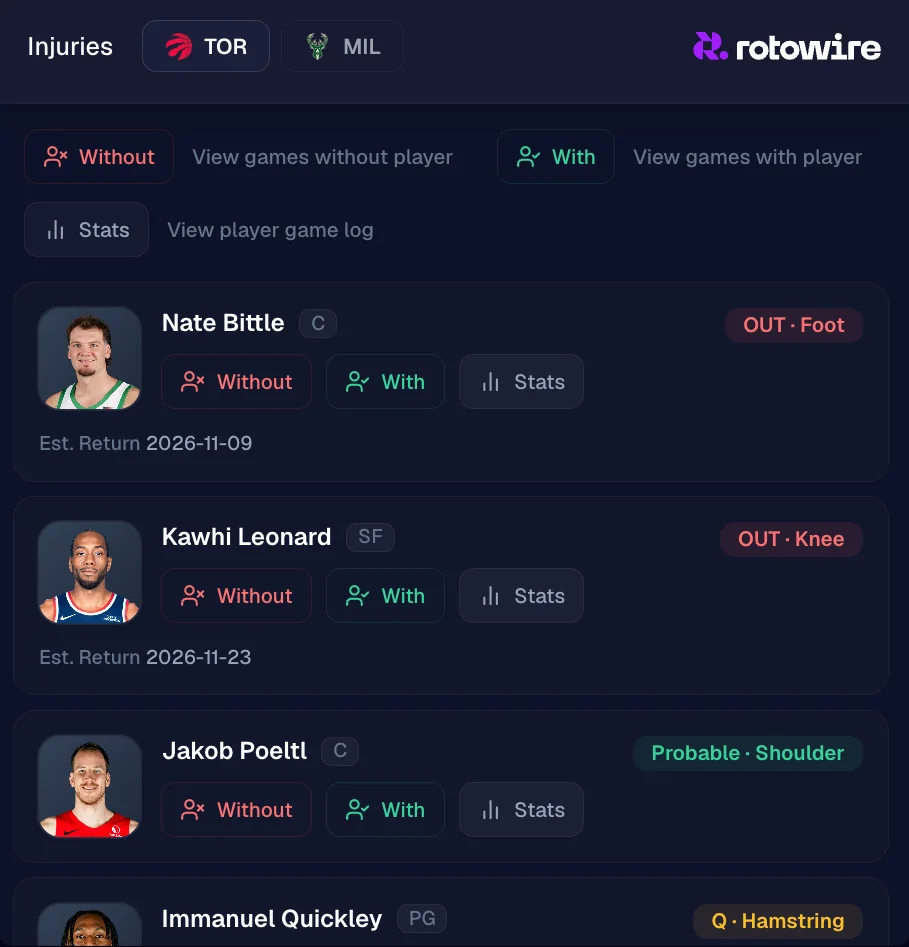
Every NBA player page has an Injuries tab with both teams' reports: status, injury and estimated return date. Toronto's list had Kawhi Leonard out with a knee injury (estimated return November 23), Jakob Poeltl probable with a shoulder injury and Immanuel Quickley questionable with a hamstring. Later in the afternoon, Scottie Barnes was added as questionable with a groin injury.
Each injured player has three buttons. Without filters the chart to games he missed. With filters it to games he played. Stats opens his own game log, which is the quickest way to see when he last played and how many minutes he had.
Ask what is actually new
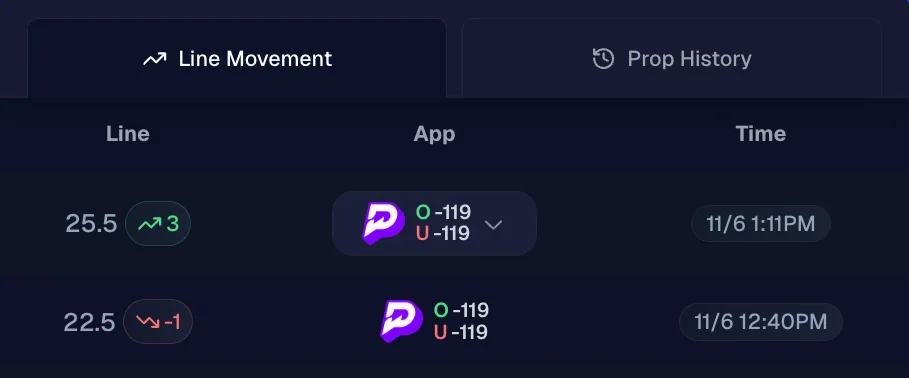
Line Movement logs each change by app and time. Barrett's line dipped a point to 22.5, then jumped three points to 25.5. The tempting read is "Kawhi is out, so Barrett scores more." But Kawhi had already missed six straight games, so his absence was old news and should already have been in the 22.5.
When a line moves and the obvious injury isn't new, look for the one that is. Here, two more starters were in doubt: Quickley and, later, Barnes. If one or both sit, Barrett's role grows beyond anything in his Kawhi-less games. If both play, the jump to 25.5 has little support. Questionable tags often aren't settled until shortly before tip-off, so a line that moves on one may move back.
Filter the chart to games without him
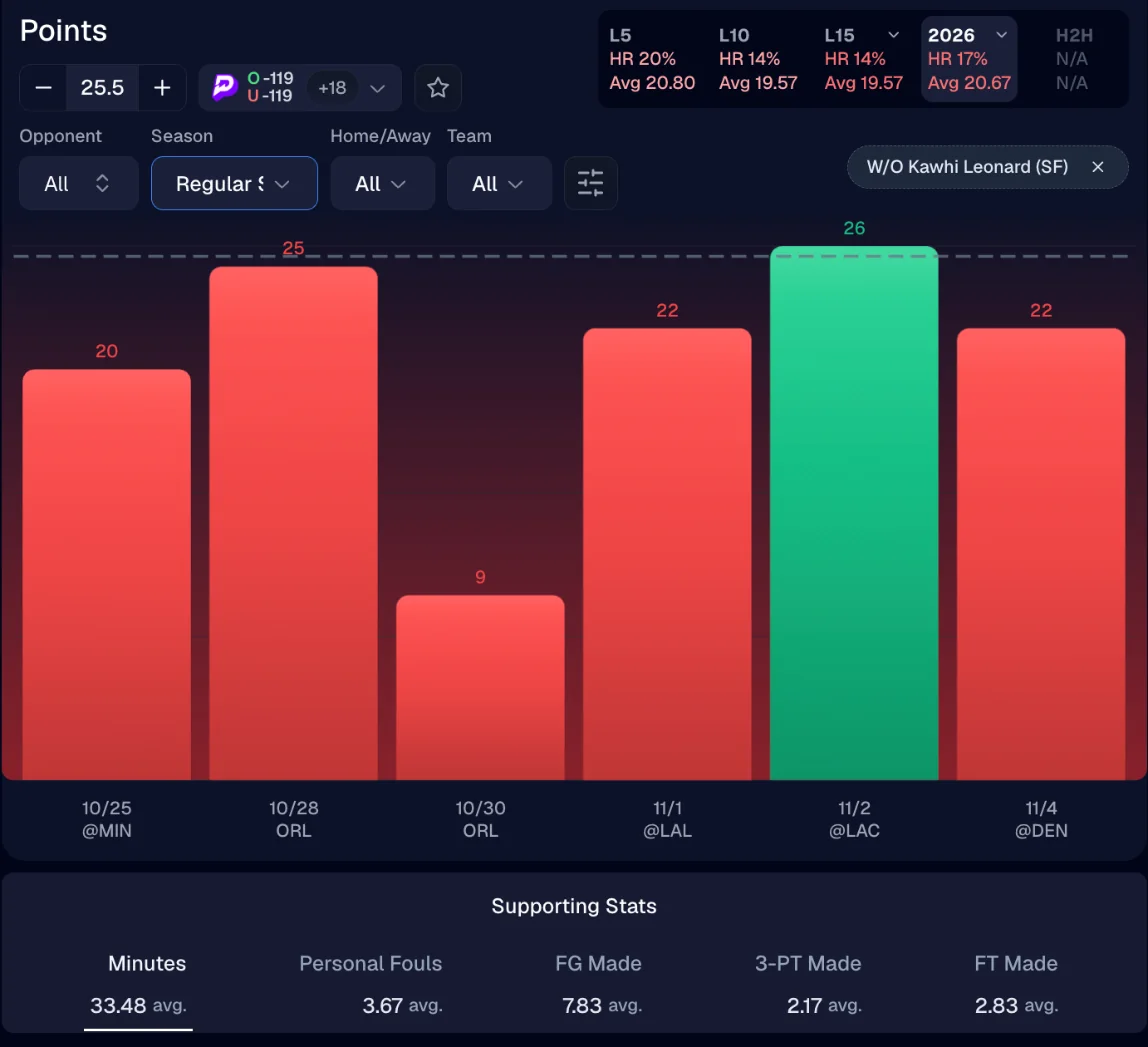
Click Without next to Kawhi and a "W/O Kawhi Leonard" chip appears above the chart. Then set Season to Regular Season and choose the 2026 window, so preseason games and older seasons don't mix in. That leaves six games: 20, 25, 9, 22, 26 and 22. Barrett cleared 25.5 once (26 at the Clippers on November 2) and averaged 20.67.
The supporting stats under the chart explain why. Without Kawhi he has played 33.5 minutes a game, so the extra minutes are real, but he made 7.8 field goals, 2.2 threes and 2.8 free throws a game. That adds up to his 20.7 points. To reach 26 he needs roughly two more made shots than he has averaged in these games. In the two games Kawhi did play, Barrett scored 20 and 23, so far the absence has bought him minutes, not points.
Usage moves in more than one stat
A missing starter's shots, rebounds and assists don't all go to the same teammate. Before taking a points line, check the player's rebounds and assists with the same Without filter. Sometimes a forward's absence shows up in a teammate's rebounds, or a guard's in someone else's assists, while the points barely move.
Use With the same way. If a player's numbers with a star teammate are close to his numbers without him, the injury isn't the story, whatever the line did.
Small samples and timing
Six games is a small sample. One more over would move Barrett's hit rate from 17% to 33%. Treat a Without split as a direction, not a forecast, and check how many games it rests on before you lean on the percentage.
Timing matters as much as the data. Pick'em lines often move within minutes of injury news, so by the time a report is public, the easy value may be gone. That is the reason to check the Injuries tab before you look at the line, not after.
Injury checklist
- Read both teams' injury reports, including probable and questionable players.
- Check Line Movement and ask which piece of news the move is reacting to.
- Filter the chart Without the injured player, with Regular Season and the current season selected.
- Compare minutes and shot volume, not only points.
- Count the games behind the split, and re-check statuses close to tip-off.
Hit rates have their own traps, covered in NBA hit rates explained, and the other side of the matchup is in NBA defense vs position. For the full workflow, see how to research NBA player props or start from the NBA research page.


